Is OpenClaw Right for You? Walk Through These Five Layers First
A lot of people ask: should I use OpenClaw? There's no universal answer — but there is a map. This five-layer framework helps you see where you are now, what your next step looks like, and what each layer actually costs.
 卡住很正常——點段落旁的 😵 卡關 讓我們知道,或直接往下滾到問答區發問。
也可以用 👍 看懂 / 😢 看不懂 告訴我們哪裡寫得好、哪裡要改。
卡住很正常——點段落旁的 😵 卡關 讓我們知道,或直接往下滾到問答區發問。
也可以用 👍 看懂 / 😢 看不懂 告訴我們哪裡寫得好、哪裡要改。
More Tools, More Confusion
Every month brings a new tool claiming to be revolutionary. Manus, Claude Code, Gemini Agentspace, Perplexity Comet…
You’re not failing to evaluate tools carefully enough. You’re missing a map.
Most people don’t pick the wrong tool. They don’t know which layer they’re actually on.
Choose a tool that’s too advanced and you’ll burn hours on setup. Choose one that’s too basic and you’ll spend forever copying and pasting. Both are expensive mistakes.
This article gives you a five-layer map — so you can see clearly: where you are now, whether you need to level up, and what leveling up will actually cost you.
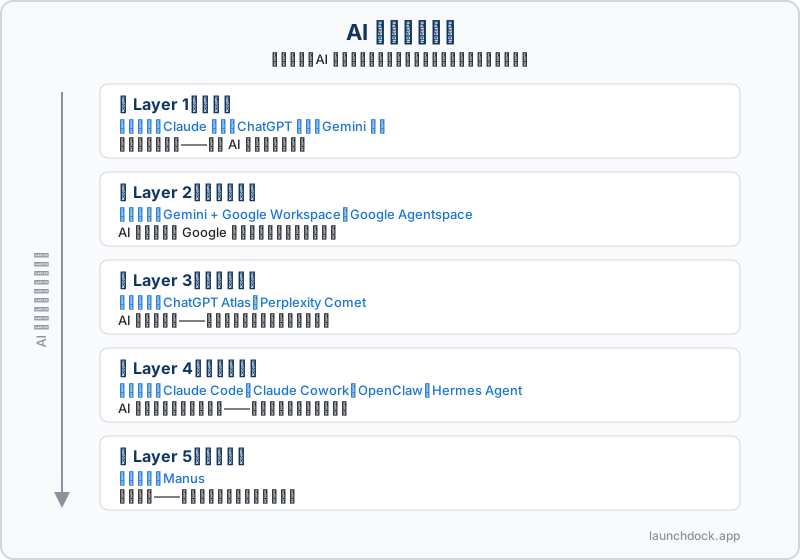
First, Understand One Core Concept: AI Control Boundary
Before we look at the map, let’s establish a framework. Every AI tool has a “how far AI’s hand can reach” boundary.
Four boundaries, from smallest to largest:
- Inside the chat box: AI stays in the conversation window — you ask, AI answers, you execute
- Reaching out: AI’s hand extends to external environments — the web, other software, commercial data
- Reaching in: AI’s hand reaches into your own systems — your files, workflows, scheduled tasks
- Boundary dissolved: You hand over full control and only see results
The Most Commonly Confused Pair: Full Automation vs. Full Delegation
These two sound similar but are fundamentally different.
Full Automation:
- Like Claude Code’s YOLO mode
- AI runs inside your environment, handling almost everything
- But the horse is still in your stable — you can see the logs, pause it, review every step, roll back
- You retain complete control
Full Delegation:
- Like Manus
- You hand the horse to someone else — you only see the final result
- The process is a black box; you don’t know how it runs
- Your control transfers to the platform
Keep this distinction in mind — it’ll make the difference between Layer 4 and Layer 5 crystal clear.
The Five-Layer Tool Map
🟢 Layer 1 | Q&A Layer
Representative tools: Claude subscription, ChatGPT subscription, Gemini subscription
What a Layer 1 person looks like:
You open a chat interface, paste in an article, ask AI to summarize it. You ask AI to draft an email, then copy-paste it into Gmail and send it yourself. Every step, you’re the one doing the doing. AI is your supercharged advisor — but your legs are still your legs.
Where the ceiling is:
You’re always the “middleman.” AI provides suggestions; you execute. Once your workload grows, the time spent copying and pasting starts to exceed the time AI actually saves you.
When you don’t need to level up:
Deep research doesn’t require leveling up. A Claude subscription is itself the most powerful research tool available right now — using Claude Projects to organize information, using Extended Thinking for deep analysis. These aren’t Layer 1 weaknesses; they’re Layer 1 strengths.
Layer 1 isn’t falling behind. It’s a choice.
When you should consider leveling up:
“You’re sick of copying and pasting.” If repetitive manual tasks cross a certain threshold — if you’re starting to feel like the robot yourself — that’s when upgrading makes sense.
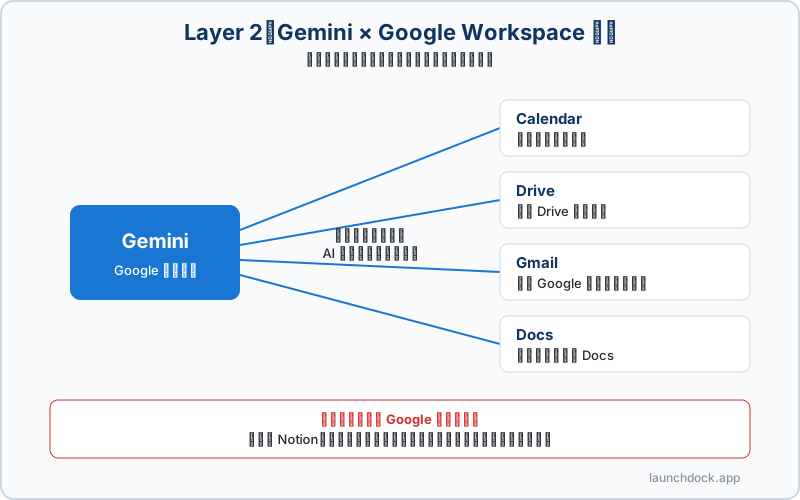
🟡 Layer 2 | Ecosystem Integration Layer
Representative tools: Gemini + Google Workspace, Google Agentspace
What a Layer 2 person looks like:
Your Calendar, Drive, Gmail, and Docs all live in the Google ecosystem. Gemini can directly look up last week’s meeting notes, organize files in Drive, and draft summaries into Docs — no copy-pasting, AI talks to your tools directly.
Why Gemini and not Claude for this:
Gemini’s model capability isn’t top-tier, but its moat is deep Google Workspace integration — something Anthropic and OpenAI simply don’t have. Gemini’s Chinese image generation (Nano Banana 2 🍌) also has advantages for relevant use cases, though it requires additional fees.
The hidden rule for choosing tools:
Your data lives somewhere. Your tools should live there too.
The real cost of switching tools isn’t learning a new interface — it’s data migration time plus the cognitive cost of disrupting workflows you’ve already built.
Where the ceiling is:
You’re limited to integration within the Google ecosystem. Want to integrate with Notion, run scheduled tasks, or operate other software on your machine? You’ve hit the edge.
🟠 Layer 3 | External Control Layer
Representative tools: ChatGPT Atlas (cross-software computer control), Perplexity Comet (commercial data collection)
What a Layer 3 person looks like:
You need AI to operate other software on your computer, or systematically collect business intelligence from the web. Not just telling AI “go find my competitor’s pricing” — AI actually opens the browser, logs into sites, and brings the data back.
The two tools serve different purposes:
- ChatGPT Atlas: AI controls your mouse and keyboard — fills forms, operates desktop apps, bridges different software
- Perplexity Comet: Specializes in commercial data collection and market intelligence — not general computer control, but automated research pipelines
Where the ceiling is:
AI controls the “external environment,” not “your own systems.” Want to control your own file system, set up scheduled tasks, or build workflows with memory? That’s Layer 4 territory.
🔴 Layer 4 | Internal Integration Layer
When you reach this layer, you need to make another choice.
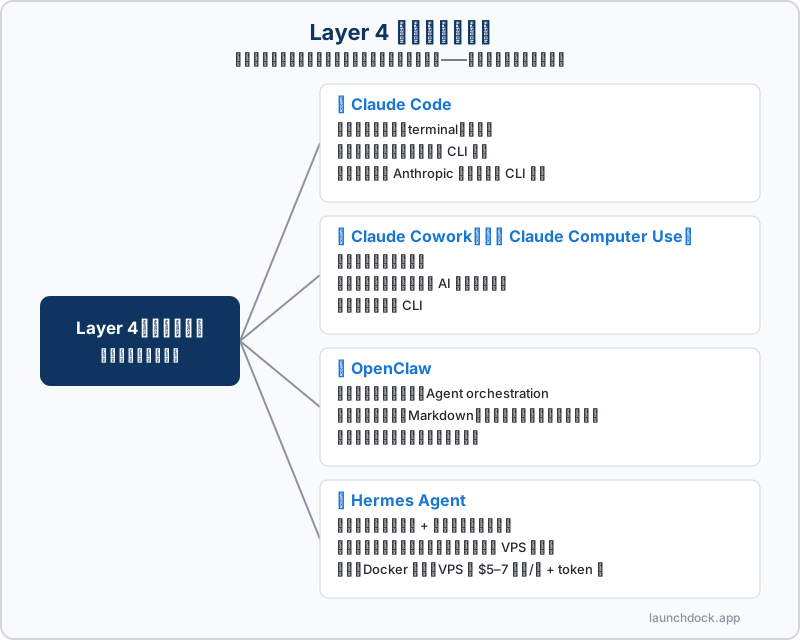
Four representative tools:
🔵 Claude Code
Strengths: File system, terminal, code
Who it’s for: Developers, or those willing to work with CLI
What YOLO mode means: Full-authorization mode. You tell Claude Code “handle this” and it can do nearly anything — modify files, run commands, install packages. But the horse is still in your stable: you see the logs, you can stop it, you can git diff every step.
Note: Requires a higher-tier Anthropic subscription and some CLI familiarity.
🔵 Claude Cowork (formerly Claude Computer Use)
Strengths: Desktop task automation
Who it’s for: Non-technical users who want AI to directly control the desktop
Takes a different route than Claude Code — no CLI knowledge needed. AI directly controls your desktop interface.
🔵 OpenClaw
Strengths: Custom workflows, Agent orchestration
Why it belongs in this layer: OpenClaw lets you configure your own workflows, with AI reaching into your own systems — managing your MEMORY.md (memory system), running scheduled tasks via the heartbeat system (HEARTBEAT.md, which executes automatically every 30 minutes).
Real cost structure:
OpenClaw isn’t model-locked, but stable production output requires a capable model (Claude Sonnet/Opus tier). High-value Chinese models (DeepSeek, etc.) work for testing but aren’t reliable for production. You’ll need Harness to control token usage and prevent runaway bills.
Who it’s for:
- Needs broad integration (connecting many tools and data sources)
- Prefers Markdown config files over CLI for workflow management
- Wants a mature community with plenty of resources
- Prefers lower setup complexity
🔵 Hermes Agent
Basic info:
- Developed by Nous Research, open source MIT, released February 2026
- Model-agnostic, LLM token-driven
- Deployment: Docker-based, requires VPS (~$5–7/month) + token costs
- Migration tools available for moving from OpenClaw
Core philosophy: Learning depth + self-improvement. Hermes gets better the more you use it — it builds new skills and optimizes workflows from your usage patterns.
Who it’s for:
- Wants complete freedom in model selection
- Accepts responsibility for maintaining a VPS server
- Wants the compounding benefits of a self-learning Agent
OpenClaw vs Hermes: How to Choose?
This isn’t about which one replaces the other. It’s about philosophy and maintenance responsibility.
| OpenClaw | Hermes Agent | |
|---|---|---|
| Focus | Broad integration, stable & mature | Learning depth, self-improvement |
| Setup difficulty | Lower (Markdown config) | Higher (VPS + Docker required) |
| Maintenance burden | Light (foundation-maintained) | Heavy (you run the server) |
| Model flexibility | High (model-agnostic) | High (model-agnostic) |
| Community size | Larger, more resources | Newer, growing |
| Self-learning | No | Yes |
Choosing a tool isn’t just comparing features. It’s choosing the level of maintenance responsibility you can accept.
⚫ Layer 5 | Full Delegation Layer
Representative tool: Manus
What a Layer 5 person looks like:
You tell Manus “research this market and compile a report.” A few hours later, you get a finished deliverable. Setup is nearly zero. Minimum friction. You just take the result and go.
Sounds great. So what’s the problem?
Manus is a black box. You don’t know how it runs, what it does, or which services it uses. It doesn’t have its own model — it calls other AI services to complete tasks. Current pricing exceeds typical subscription levels, and the economics are widely considered unsustainable.
This creates a critical risk:
Build your stack on a foundation that will last.
If your core workflow depends on a platform without sustainable economics, and that platform shuts down one day, your workflow disappears with it.
Note: Microsoft Copilot is not included in this discussion — the experience gap is too large to make meaningful comparisons.
Walk the Map: Find Your Layer
Answer these 5 questions in order. Stop at the first answer that fits you.
Question 1: Is your work primarily “thinking output” or “taking action”?
Thinking output (writing, research, analysis, summarizing): → Stay at Layer 1. Deep research doesn’t need a higher layer. A Claude subscription is the strongest research tool available. Upgrading won’t make your analysis better — it’ll just give you more setup to maintain.
Taking action (repetitive operations, automated workflows, cross-tool integration): → Continue to Question 2
Question 2: Is your data and workflow deeply embedded in the Google ecosystem?
Yes — Drive, Docs, Gmail is my work center: → Layer 2 (Gemini + Workspace). Your data lives in Google; your tools should too. Don’t switch tools for switching’s sake.
No specific ecosystem dependency: → Continue to Question 3
Question 3: Do you need AI to control “external environments” or “your own systems”?
External environments (other people’s websites, commercial databases, cross-software desktop control): → Layer 3 (ChatGPT Atlas or Perplexity Comet, depending on your need)
Your own systems (your files, your workflows, your scheduled tasks): → Continue to Question 4
Question 4: Are you willing to learn how to set up an environment? Can you accept usage-based billing?
No — I just want something that works; don’t ask me to configure Docker: → Layer 5 (Manus). But please read the business risk table below first, so you understand exactly what risk you’re accepting.
Yes — I can handle config files, CLI, and usage-based billing: → Layer 4 — continue to Question 5 to choose your tool
Question 5: How much maintenance responsibility can you accept?
Just Markdown config files, no servers: → OpenClaw
Comfortable running a VPS, want the compounding benefits of a self-learning Agent: → Hermes Agent
Just want official products, no infrastructure to manage: → Claude Code (developers) or Claude Cowork (non-technical users)
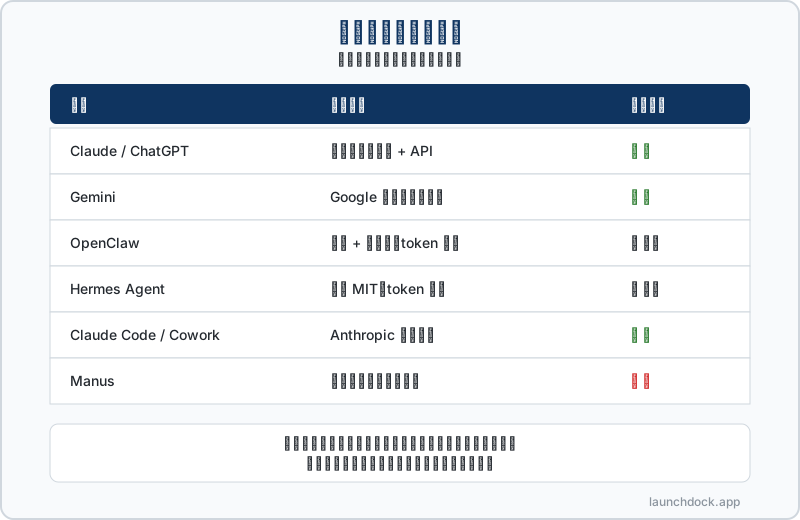
A Tool’s Business Lifespan: Build on a Foundation That Lasts
Choosing a tool isn’t just about “does it work well right now.” It’s also “will it still be here when I need it most.”
| Tool | Business Model | Risk Level |
|---|---|---|
| Claude / ChatGPT | Own model, subscription + API | 🟢 Low |
| Gemini | Google ecosystem, own model | 🟢 Low |
| OpenClaw | Open source + foundation, token-driven | 🟡 Medium-Low |
| Hermes Agent | Open source MIT, token-driven | 🟡 Medium-Low |
| Claude Code / Cowork | Official Anthropic product | 🟢 Low |
| Manus | No own model, subsidized growth | 🔴 High |
Find Your Layer. Chase Needs, Not Tools.
Every month, a new tool claims to be revolutionary. But most of the time, it just costs you more hours evaluating tools instead of making your work better.
This map isn’t meant to tell you which tool is the strongest. It’s meant to help you find “the layer you actually need right now” — and then go deep at that layer until you genuinely hit the ceiling, before moving up.
- Your work is primarily thinking output → Layer 1, master Claude, no need to upgrade
- Your data lives in Google → Layer 2, leverage Gemini Workspace integration
- You need external automation → Layer 3, pick the right tool
- You want to control your own workflow → Layer 4, choose the maintenance responsibility you can accept
- You just want results and accept the black box → Layer 5, but know what you’re signing up for
Most people don’t pick the wrong tool. They just don’t know which layer they’re on.
Now you have a map.
Further Reading
- Want to dig into the decision logic for tool selection → Which AI Tool Should I Use? 5 Questions to Stop the Guessing
- Want to understand the full landscape of AI technology evolution → AI Tool Landscape: The Five-Wall Framework
- Want to understand what OpenClaw is → Why Do You Need OpenClaw?
這篇文章對你有幫助嗎?
💬 問答區
卡關了?直接在這裡問,其他讀者和作者都能幫忙解答。
載入中...
Found this useful? Share it with a friend who’s also getting their hands dirty
Share on LINE