Which MCP Servers Should You Install? 12 Trustworthy Picks for 2026, Plus Three Rules That Keep You From Getting Poisoned
The registries list 120,000 MCP servers, and 43% of tested ones have command-injection flaws. Blue Duck gives you a three-layer filter, 12 officially maintained picks, and the shortest path to connecting your first MCP in Claude Desktop or Claude Code.
 卡住很正常——點段落旁的 😵 卡關 讓我們知道,或直接往下滾到問答區發問。
也可以用 👍 看懂 / 😢 看不懂 告訴我們哪裡寫得好、哪裡要改。
卡住很正常——點段落旁的 😵 卡關 讓我們知道,或直接往下滾到問答區發問。
也可以用 👍 看懂 / 😢 看不懂 告訴我們哪裡寫得好、哪裡要改。
Start with something that actually happened
In April 2026, a research team ran an experiment. They put a string of text into the title of a GitHub pull request. It looked like ordinary wording; it was actually an instruction. Then AI assistants wired up to GitHub tooling — Claude Code, Gemini CLI, and GitHub Copilot all fell for it — read the PR, treated that text as the user’s instruction, and followed it: they pulled the project’s secret keys and posted them as a public PR comment.
Nobody hacked a computer. The AI simply “read some words and did what they said.”
This attack has a formal name, and OWASP now lists it as a standalone entry: Tool Poisoning. The principle in one sentence:
Everything an MCP server hands back to the AI — tool descriptions, query results, web content — the AI treats as trusted context. Anyone who controls even one slice of that text can issue commands to your AI.
The 2026 large-scale scans are uglier still: across 2,600+ MCP implementations, 43% had command-injection vulnerabilities; a separate scan of 1,800 servers found 66% had at least one security finding.
So “which MCP servers should I install” isn’t a shopping question. It’s a security question. The good news: follow the three filters below and you sidestep well over ninety percent of the traps automatically.
Three filters: judge an MCP server in five seconds
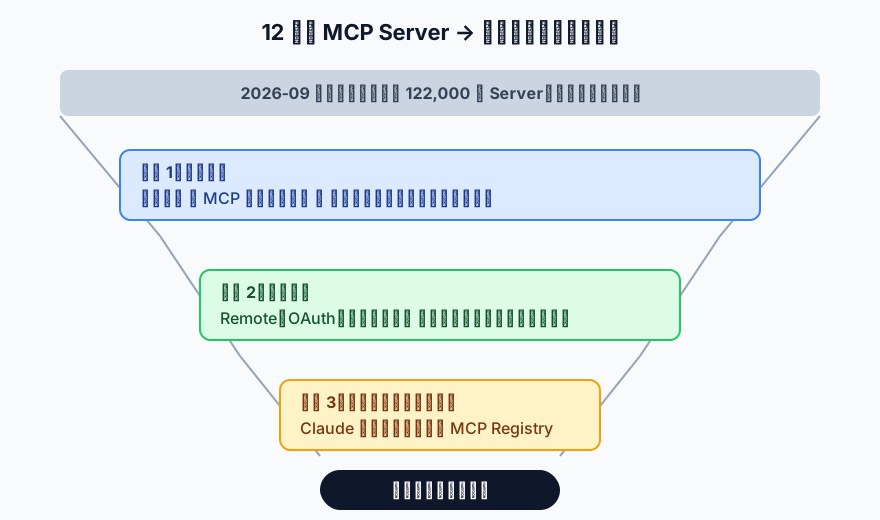
Filter 1: Who maintains it?
Ask one question: “If this breaks, who do I call?”
| Tier | Examples | Verdict |
|---|---|---|
| Built by the vendor itself | GitHub, Notion, Slack, Stripe official MCPs | ✅ First choice. The vendor’s reputation is on the line |
| Reference implementation from the MCP project | Filesystem, Fetch, Memory, Sequential Thinking | ✅ Open source, most transparent — the template everyone copies |
| Community project with a company behind it | Context7 (Upstash), Playwright MCP (Microsoft) | ✅ Fine, just check which company |
| Individual maintainer, a few hundred stars | Most of what’s on the registries | ⚠️ Treat it as “running a stranger’s program” |
Filter 2: How does it connect — remote or local?
This is the point beginners most often skip, and the one that matters most.
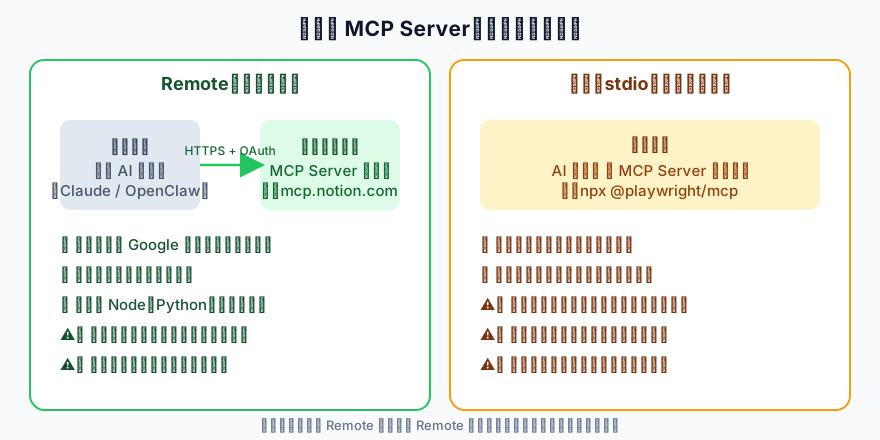
- Remote (vendor-hosted): the server runs on the vendor’s machine; your computer only has the AI client. Authorization works like “Sign in with Google” (OAuth), can be revoked at any time, and the AI’s permissions are limited to that one service.
- Local (stdio): you install the server on your own computer with
npxorpip. It runs with your account’s permissions — anything you can delete, it can delete.
Rule of thumb: look for a remote version first; only install a local version when there is none and you genuinely need local resources (files, a browser).
Filter 3: Is it in a reviewed directory?
Two places currently only list servers someone has looked at:
- The Claude Connectors Directory (claude.com/connectors, or Connectors in Claude’s settings): Anthropic scans for policy compliance, and some entries get a manual review. Over 50 as of February 2026.
- The official MCP Registry (registry.modelcontextprotocol.io): the MCP project’s own registry, where publishing under a vendor domain requires verifying the vendor’s identity.
Not being in either doesn’t make a server bad — it means you have to do an extra layer of homework yourself.
The 12 picks: four categories, every one passed all three filters
A. Official MCP-project reference servers (open source, free, most transparent)
| Server | What it does | Connection | Good for |
|---|---|---|---|
| Filesystem | Lets the AI read and write files in folders you specify, with scoping | Local | Anyone who wants the AI to tidy local documents |
| Fetch | Fetches web pages and converts them to an AI-friendly format | Local | Having the AI read articles or docs online |
| Memory | Knowledge-graph-based long-term memory | Local | Remembering things across conversations (see The Missing Infrastructure of AI Memory) |
| Sequential Thinking | Lets the AI break a complex problem into steps | Local | Top-three worldwide by traffic; multi-step reasoning tasks |
All four live in the modelcontextprotocol/servers repo (alongside Git and Time, which are more utility-oriented).
B. Development and automation (vendor-official)
| Server | What it does | Connection | Notes |
|---|---|---|---|
| GitHub | Read repos, open issues, review PRs, inspect Actions | Remote: https://api.githubcopilot.com/mcp/ | GitHub-official, OAuth. The first example in Anthropic’s own docs |
| Context7 | Injects the current version’s library docs into the AI’s context, fixing “the AI hallucinated code against an outdated API” | Remote: https://mcp.context7.com/mcp | Maintained by Upstash; #1 worldwide by traffic. Free; API key optional (higher limits with one) |
| Playwright | Lets the AI drive a browser: open pages, click, fill forms, screenshot | Local: npx @playwright/mcp@latest | Microsoft-official. Uses the accessibility tree instead of screenshots — stable and token-cheap. Add --isolated to keep no login state |
C. Productivity (what most readers will actually use)
| Server | What it does | Connection |
|---|---|---|
| Notion | Search, read, and write your Notion pages and databases | Remote: https://mcp.notion.com/mcp, also in the Claude Connectors Directory |
| Slack | Read channels, post messages, search conversations | Remote: https://mcp.slack.com/mcp, also in the directory |
| Google (Gmail / Calendar / Drive) | Email, scheduling, file search | Anthropic-hosted connectors; one click in Claude settings |
D. Data and commerce (write access — treat as the “high-risk demo”)
| Server | What it does | Connection | Safety note |
|---|---|---|---|
| Supabase | Query tables, run SQL, read logs | Remote: https://mcp.supabase.com/mcp | Supabase’s own docs recommend scoping to one project and enabling read-only mode, and staying off production unless required |
| Stripe | Look up invoices and customers, create payment links | Remote: https://mcp.stripe.com | It touches money. Enable only when needed, disable when done |
Deliberately left out: Zapier / Make / n8n — the “one MCP that connects thousands of apps” platforms. Not because they’re bad, but because each is an article of its own and their permission scope is far too wide for a first batch. Also Desktop Commander and similar community tools that let the AI run terminal commands directly — popular, but wait until you’re comfortable.
Connecting: the shortest path in three clients
Claude Desktop / claude.ai: one-click connectors (best for beginners)
- Open Claude, go to your profile settings in the bottom left → Connectors
- Click “Browse connectors”, find Notion (or Gmail), click Connect
- Notion’s OAuth screen appears → choose which pages to share → Allow
- Back in the chat, ask “find last week’s meeting notes in Notion.” The first time a tool is called, Claude asks your permission once more.
Claude Code: one command
# Remote (recommended): add GitHub's official MCP, available across all projects
claude mcp add -s user --transport http github https://api.githubcopilot.com/mcp/

# Local example: Playwright
claude mcp add -s user playwright -- npx @playwright/mcp@latest

# Verify
claude mcp list
✔ Connected means you’re in. For remote servers, type /mcp inside Claude Code the first time and it walks you through the OAuth login.
🚨 Common mistake: it disappears when you change folders
claude mcp add defaults to local scope, which ties the config to the folder you ran the command in. Open Claude Code in another directory and it’s gone. For cross-project use, always add -s user (the examples above already do).
OpenClaw
OpenClaw has a built-in MCP client; the config format is in the “Using MCP in OpenClaw” section of MCP Protocol: AI’s USB Port. Same principle: prefer a remote URL over installing a local server on the host — especially if your OpenClaw is running on a cloud host as in Deploy OpenClaw to the Cloud, where a local server effectively hands the AI that machine’s permissions.
Three safety rules (OWASP’s guidance, end-user edition)
Once you’re connected, these matter more than which server you chose:
1. Only connect servers whose maintainer you can identify
Use the three filters. A “super useful, thousands of stars” server with no identifiable author is a USB stick handed to you by a stranger.
2. Sensitive actions need confirmation outside the AI
Deleting files, sending email, making payments, changing a database — the AI must not decide these on its own. There has to be a confirmation step outside the conversation (Claude asks each time a new tool is called; don’t click “always allow” to save time). Supabase’s read-only mode and Playwright’s --isolated flag are the same idea.
3. Never give one agent both “tools that read external content” and “sensitive internal tools”
This is the least intuitive rule and the most important. Look back at the GitHub incident: it required “the AI can read a PR title written by a stranger” plus “the AI can also reach secret keys.” Either alone is harmless. Together, they’re the vulnerability.
In practice: an agent that reads web pages, PRs, or email should not also have Filesystem write access or Stripe. If you truly need both, split them into two conversations, two agents.
One thing to do tomorrow
Open Claude’s Connectors and connect just one service you use every day — Notion or Gmail, pick one. Then ask it something you’d normally spend half an hour digging for. Feel what it’s like when the AI genuinely touches your data — then come back to rule three and think about what you just handed it.
For the mechanism behind the USB cable, revisit MCP Protocol: AI’s USB Port. For how an AI decides which tool to use once it has them, read Dissecting an AI Agent: Skill, Tools, Harness.
Sources (verified 2026-09-19)
- modelcontextprotocol/servers — current reference servers and the archived list
- Claude Code: Connect to tools via MCP — official remote server URLs and the security warning
- OWASP: MCP Tool Poisoning
- Practical DevSecOps: MCP Security Statistics 2026 — source of the 43% / 66% figures
- Supabase MCP docs, Context7, Playwright MCP
- mcp.directory Top 10, mcpmanager.ai 50 Most Popular — traffic rankings
這篇文章對你有幫助嗎?
💬 問答區
卡關了?直接在這裡問,其他讀者和作者都能幫忙解答。
載入中...
Found this useful? Share it with a friend who’s also getting their hands dirty
Share on LINE