Prompt Engineering, Context Engineering, Loop, Harness: Four AI Terms Explained With 200 Receipts
These four terms are everywhere right now, but almost nobody explains how they divide the work. Blue Duck takes one chore you have definitely faced — turning 200 receipts into an expense report — and shows exactly which part each term owns.
 卡住很正常——點段落旁的 😵 卡關 讓我們知道,或直接往下滾到問答區發問。
也可以用 👍 看懂 / 😢 看不懂 告訴我們哪裡寫得好、哪裡要改。
卡住很正常——點段落旁的 😵 卡關 讓我們知道,或直接往下滾到問答區發問。
也可以用 👍 看懂 / 😢 看不懂 告訴我們哪裡寫得好、哪裡要改。
The problem isn’t the model. It’s four things you didn’t manage
Over the past couple of years you have seen these four terms on slides, in posts, on product pages:
Prompt engineering, context engineering, loop, harness.
They get thrown around as if they were different names for the same thing. They are not. Each one owns a completely different job, and if you skip any one of them, your results fall apart at exactly that spot.
Blue Duck isn’t going to hand you four definitions — you can Google those. Let’s take an actual chore instead: you have 200 receipts, and you need them turned into an expense report.
Doing it yourself takes three hours, so you want to hand it to an AI. Good. Let’s start with how you ask.
The whole picture first
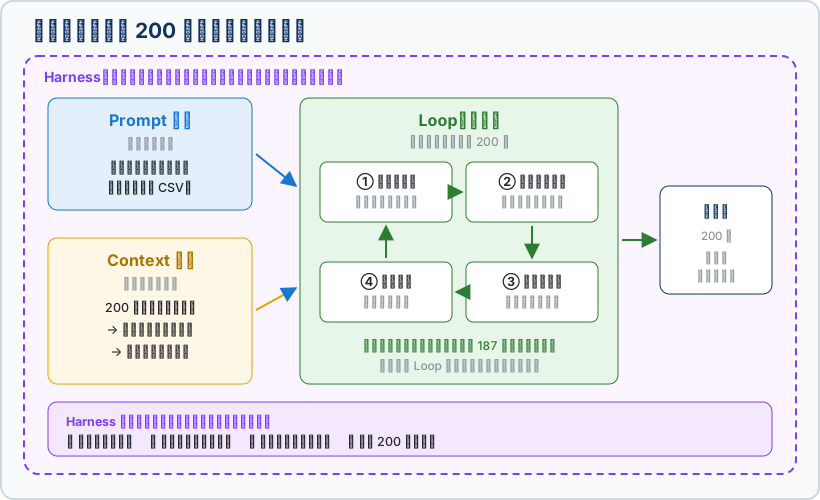
We’ll unpack this box by box. For now just remember its shape: three of them do the work, one stands outside and supervises.
1. Prompt engineering: the instruction you give
The question it answers: “What exactly do you want done?”
You walk up to an intern and say, “Sort out these receipts.” That’s a bad instruction. Sorted into what? A spreadsheet, or handwritten? Categorized how? Do invoices count as the same thing as receipts?
Compare that with:
“For each receipt, pull three fields: date, item, amount. Output as CSV, one row per receipt, dates formatted like 2026-09-12. If a field is unreadable, write ‘unreadable’ — do not guess.”
(CSV is just a spreadsheet file Excel can open. You have to go into that much detail, because “sort these out” is every bit as vague to an AI as it is to someone on their first day.)
Same model, same receipts. Rewriting that one paragraph alone changes the result dramatically. That’s prompt engineering — turning the standard in your head into words the other side can act on.
Skip it and: the format changes every single time, and reformatting costs you more than doing the job yourself.
But note: this layer only settles whether it knows what to do. It does nothing about whether it has the material. Plenty of people get stuck here — no matter how elegant the prompt, if the data never made it in, the AI can only invent.
2. Context engineering: what’s actually in front of it
The question it answers: “For this round, what should be on its desk?”
Here’s the hard physical limit: there is a cap on how much an AI can read at once. That cap is the context window, and you can picture it as the intern’s desk. The desk is only so big; pile on more and the stack you put down first gets pushed off the edge.
So what happens if you dump all 200 receipts in at once?
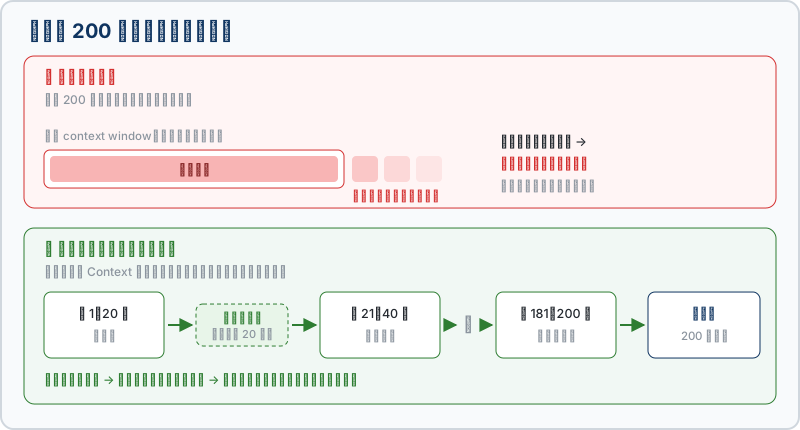
Once the early ones are pushed out, the AI does not tell you “I can’t see those anymore.” It keeps writing from impression — which is exactly how you end up with that report that’s beautiful at the top and fabricated at the bottom.
So the job becomes: feed it 20 receipts this round, keep a one-line summary (“20 processed, running total 8,400”), then feed the next batch. Deciding what goes in, what stays, and what can be dropped — that is context engineering.
Skip it and: entries go missing, amounts get invented, and you can’t tell which ones went wrong.
Worth adding: everything on that desk costs money — every batch burns tokens. Good context engineering isn’t just more accurate, it’s cheaper.
3. Loop: one receipt at a time, 200 times over
The question it answers: “How many passes does this take, and what gets checked each pass?”
Most people use AI like this: ask a question, get an answer, done. That’s one shot.
But 200 receipts can’t be solved in one shot. It has to go around:
- Read one receipt
- Fill in one row
- Check the amount against the receipt
- Move to the next one and let the previous one go
Then back to step 1. Two hundred times. That cycle — finish a round, look at the result, decide what the next round does — is the loop. The Think → Act → Observe → Decide cycle in our OpenClaw Agent Complete Guide is describing the same thing.
The point of a loop isn’t repetition. The point is that at the end of each round it looks at the result before deciding what comes next. This receipt is unreadable? Flag it and carry on, rather than stalling the whole batch. That’s also the real dividing line between an agent and a chatbot.
Skip it and: you’re forced to cram all 200 into a single conversation (back to the disaster in section 2), or you sit there copy-pasting 200 times — in which case, what did the AI save you?
4. Harness: the layer standing outside, supervising
The first three are all about getting the work done. But one question is still unanswered:
What happens when it gets something wrong?
- The amount the AI reads off receipt 87 doesn’t match the receipt. Should it stop, or write it down anyway?
- One image is too blurry to read. Retry? Skip? Abort the batch?
- It’s on iteration 300 and still going. Who calls time?
- It decides to “helpfully tidy up” by deleting your old report. Who stops it?
Whatever makes those calls is the harness. It’s the control layer wrapped around the model, responsible for setting boundaries, verifying results, handling errors, and deciding when to stop.
In Dissecting an AI Agent Blue Duck compared it to the head chef in a kitchen. Here’s a version closer to your situation: the harness is the person standing next to the intern, signing off on the work. However diligent the intern is, with nobody checking, the wrong answer ships anyway.
Skip it and: this is the only one of the four whose failure you can’t see at the time. Botch the first three and the report is visibly bad. Lose the harness and the report looks perfectly complete — until you file it and discover row 87 was invented.
Four terms, one table
| Term | The question it owns | On the receipt job | What goes wrong without it |
|---|---|---|---|
| Prompt engineering | What you want done | ”Pull date/item/amount, output CSV, write ‘unreadable’ if unsure” | The format changes every time; you reformat forever |
| Context engineering | What’s in front of it | 20 per batch, keep a summary, then the next batch | Missed entries, invented amounts, no way to trace the error |
| Loop | How many passes, checking what | Read one → fill a row → check the amount → next, 200 times | One overstuffed conversation, or 200 manual pastes |
| Harness | What happens on failure, when to stop | Stop and ask when it doesn’t match; never invent; stop at 200 | The report looks complete — some rows are fiction |
The one-line version: prompt is the instruction, context is the material, loop is the rhythm, harness is the sign-off.
Blue Duck’s aside: why these four got tangled together
Two reasons, neither of them technical.
First, “prompt engineering” was oversold. For a few years it was all “1,000 magic prompts” and “prompt engineer, six-figure salary,” so everyone concluded that using AI well equals writing better spells. Plenty of people polished their spells to perfection and then failed completely at the step where the data never made it in.
Second, “context engineering” only became popular recently. And for a very practical reason: as models got stronger, people noticed the remaining failures mostly weren’t stupidity — the model simply didn’t have the right material in front of it. The term’s arrival is essentially the field saying: stop tuning the spell, go manage your data.
As for loop and harness, those stayed inside engineering circles because they aren’t sexy — they aren’t something you buy and instantly become better. They just happen to be the two layers that decide whether an AI tool can actually deliver work.
So what does this mean for you
You don’t need to write code, but these four terms give you a ruler for evaluating AI tools. Next time someone pitches you an AI assistant, don’t just ask which model it runs. Ask these four:
- “Where do I write down my rules?” (Is there anywhere to set a prompt or system prompt?)
- “How does my data get in, and what happens when there’s more than it can read at once?” (Is there any context engineering, or does it just overflow?)
- “Can it work through a large batch on its own?” (Is there a loop, or is it one question at a time?)
- “When it gets something wrong, does it stop — or does it hand it over anyway?” (Is there a harness? This one matters most, and the fewest people can answer it.)
You’ll find a lot of salespeople can’t answer number 4. When they can’t, there usually isn’t one.
One thing you can do tomorrow
You don’t need to buy anything. The ChatGPT, Gemini, or Claude you already have is enough to practice the first two layers.
Pick a sorting chore that would normally take you 30 minutes — tidying quotes, turning meeting notes into action items, categorizing a stack of emails — and deliberately do two things:
- Write the rules before you ask. Fields, format, what to do when unsure. That’s prompt engineering.
- Don’t dump it all in at once. Split it into batches, ask for a one-line summary after each, then feed the next. That’s context engineering.
Afterwards you’ll feel it clearly: the consistency of the result has very little to do with which model you picked.
As for loop and harness — those are what you need when you want the whole thing to run to completion without you watching. That’s agent territory.
🔗 Further reading
- 🧠 The harness layer in full → Anatomy of an AI Agent: Skill, Tools, Harness
- ✍️ How to write prompts that work → Prompt Engineering Basics
- 📦 Managing context and memory → AI Agent Memory Guide
- 🔁 What a loop looks like in a real agent → What Is an Agent
- 💰 The material costs money → Token Economics
Got thoughts to share with Blue Duck? Head to the homepage discussion!
這篇文章對你有幫助嗎?
💬 問答區
卡關了?直接在這裡問,其他讀者和作者都能幫忙解答。
載入中...
Found this useful? Share it with a friend who’s also getting their hands dirty
Share on LINE