Create a LINE Login Channel and Add a LIFF App: Turn Your Web Page Into a Mini App Inside LINE
Create a LINE Login channel in the LINE Developers console, add a LIFF App under the LIFF tab, and grab your LIFF ID and LIFF URL. A 6-step walkthrough with screenshots — plus what LIFF is for, where it fits, and the spots people get stuck.
 卡住很正常——點段落旁的 😵 卡關 讓我們知道,或直接往下滾到問答區發問。
也可以用 👍 看懂 / 😢 看不懂 告訴我們哪裡寫得好、哪裡要改。
卡住很正常——點段落旁的 😵 卡關 讓我們知道,或直接往下滾到問答區發問。
也可以用 👍 看懂 / 😢 看不懂 告訴我們哪裡寫得好、哪裡要改。
In one line: Create a “LINE Login” channel in LINE Developers, add a LIFF App under the LIFF tab, and grab your LIFF ID and LIFF URL — then your web page can be packaged as a mini app that opens right inside LINE.
Keywords: LINE Developers, LINE Login, LIFF, LIFF App, LIFF ID, LIFF URL, Endpoint URL, Scopes, openid, profile, Provider, Channel, Create a new channel, Full size, booking page, registration page, member page
What is LIFF, and what can it do for you?
LIFF (LINE Front-end Framework) is LINE’s front-end framework that lets you package your own web page so it opens directly inside the LINE app. Users don’t leave LINE, don’t sign up again — they tap one link and your page opens inside LINE, and you instantly get their LINE identity.
Compared to a normal web page, LIFF adds three things a plain page can’t do:
| Capability | Normal web page | LIFF page |
|---|---|---|
| Opens seamlessly inside LINE | ❌ Pops out to an external browser | ✅ Opens right inside LINE |
| Gets the user’s identity | Build your own login | ✅ One tap via LINE Login |
| Share / message friends | ❌ | ✅ shareTargetPicker |
Where does it fit?
LIFF shines whenever a page needs to know who this is:
- Booking / registration pages: the user’s LINE name is filled in automatically — no re-typing their details.
- Membership / loyalty pages: use the LINE identity as the member ID, no username/password.
- Surveys / forms: fill them out inside LINE, then share to friends with one tap.
- Storefront pages: browse and order inside LINE, get notified back in the chat.
💡 LIFF solves identity and seamless experience. If what you want is an account that replies on its own (e.g. a Cloudflare Workers backend wired to the Messaging API), that’s a different path — the two work well together.
To use LIFF you first need a LIFF App, and a LIFF App must live under a LINE Login channel. The 6 steps below create that channel and the LIFF App.
Before you start
- A LINE account, logged in to LINE Developers.
- An existing Provider (
aivisionin this example). A Provider is “your developer identity / organization,” and multiple channels can live under it. - A web page URL you want to wrap in LIFF (must be HTTPS). A temporary HTTPS URL is fine during development — come back and change it later.
Step 1: Create a new channel under your Provider
Open the Channels tab of your Provider (aivision here) and click the “Create a new channel” (+) card in the top-left.
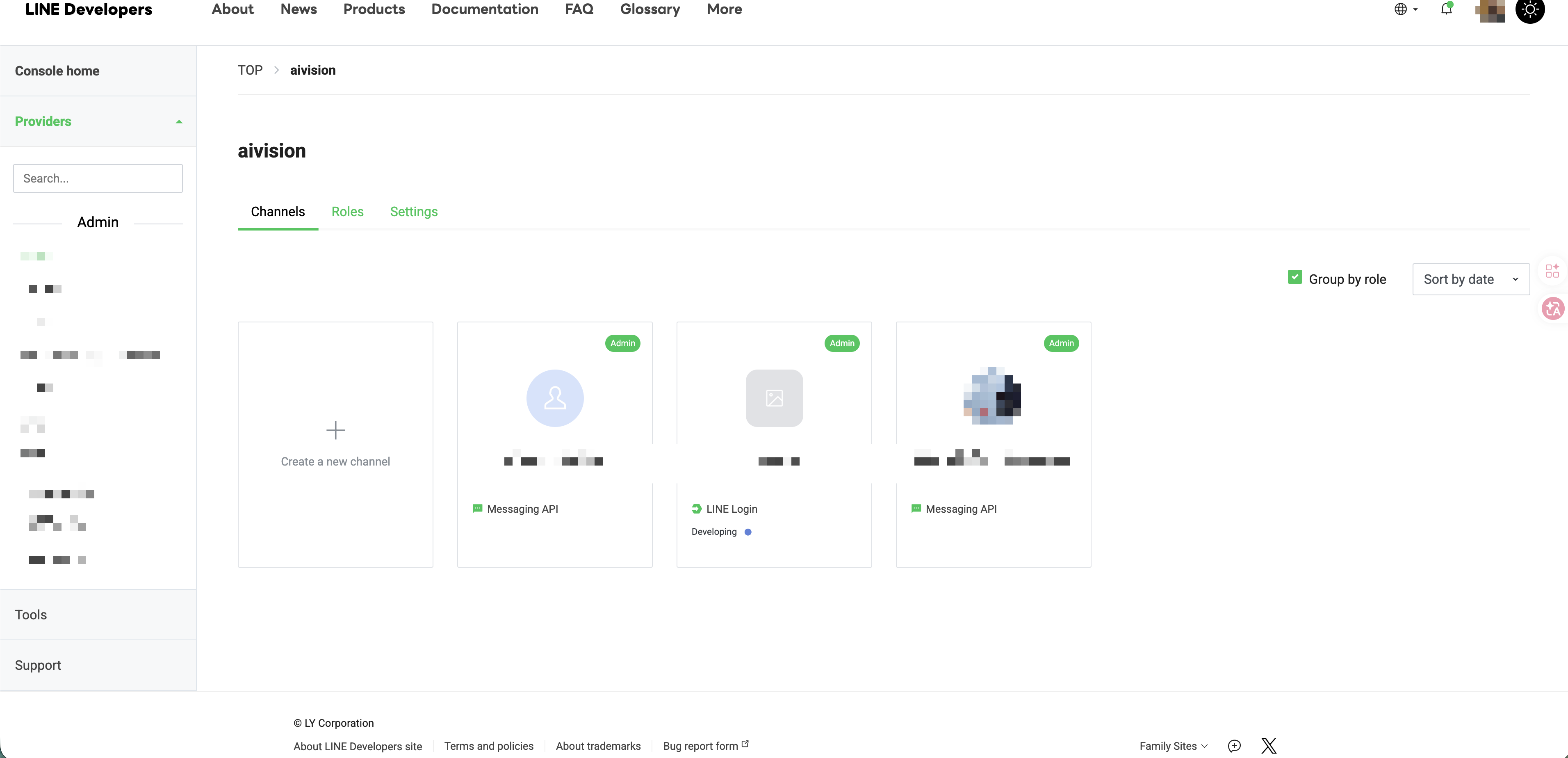
One Provider can hold multiple channels at once (Messaging API, LINE Login, etc.), each independent of the others.
Step 2: Choose “LINE Login” as the channel type
The Create a new channel dialog shows four types: LINE Login, Messaging API, Blockchain Service, LINE MINI App. Pick “LINE Login.”
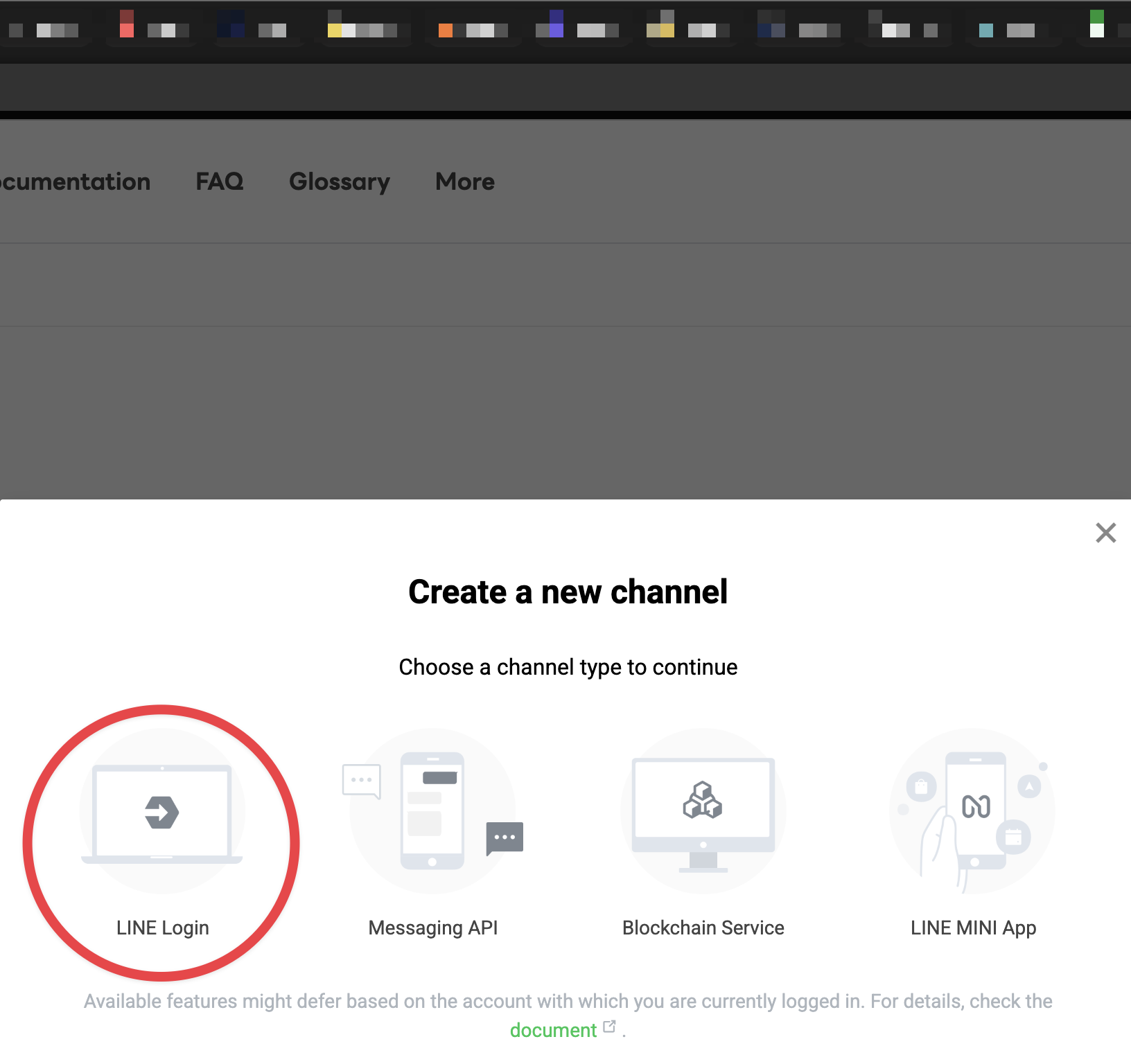
🚨 Why not pick Messaging API?
Many people instinctively click Messaging API (that’s for building a bot that replies). But LIFF ships together with the LINE Login channel — for a “web page that opens inside LINE,” the correct entry point is LINE Login. Pick the wrong type and there’s simply no LIFF tab inside.
(LINE MINI App is a LINE-reviewed, more deeply integrated version with a higher bar; for your own page, plain LIFF is the place to start.)
Step 3: Open the channel and switch to the LIFF tab
Once created, open the channel (booking-course here, type LINE Login, status Developing). The tab bar shows Basic settings|LINE Login|LIFF|Roles — click LIFF.
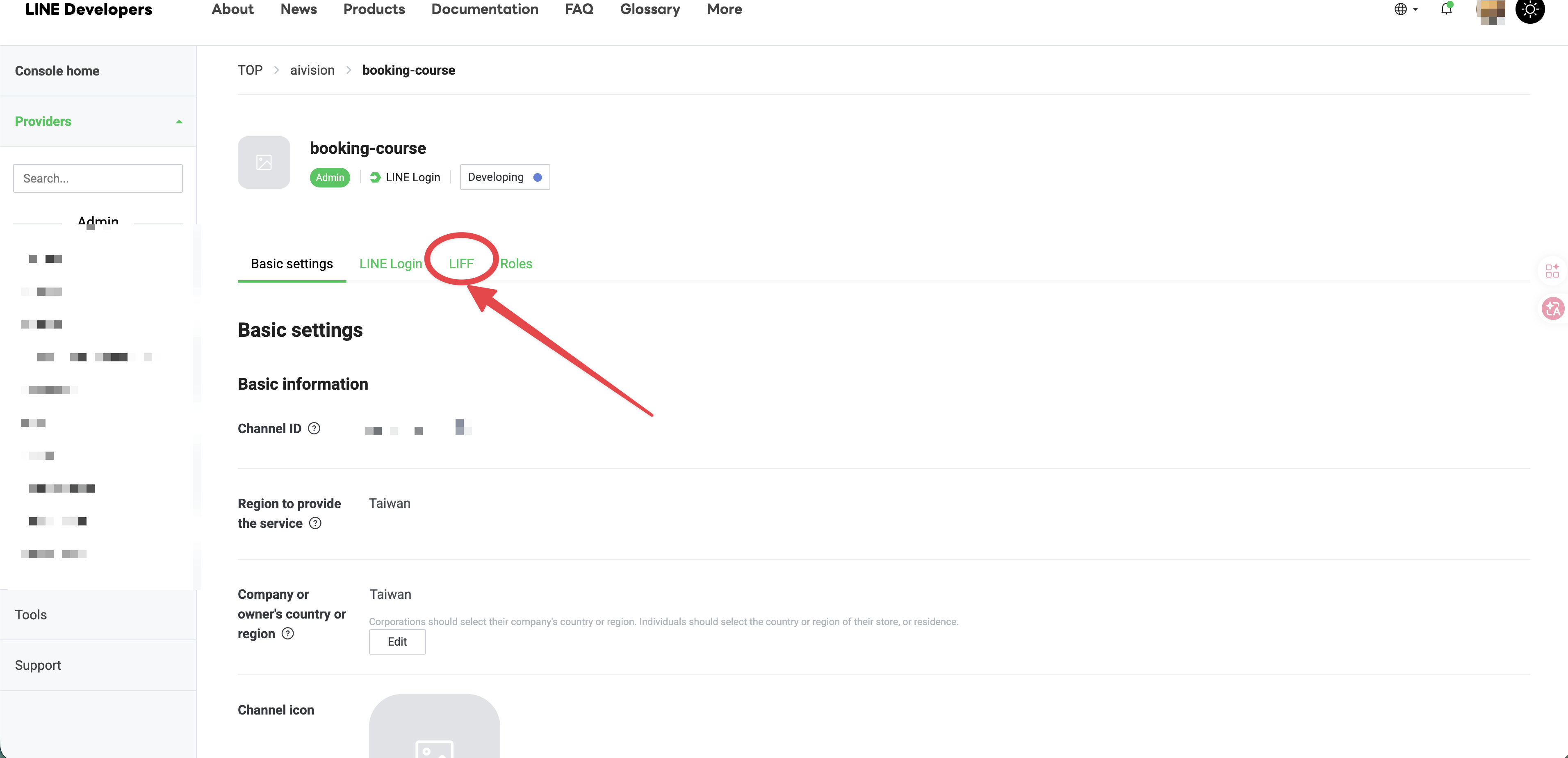
The Channel ID and service region (Taiwan here) live on the Basic settings page. The Channel ID is a confidential identifier — always redact it before publishing screenshots (every screenshot in this article has been redacted).
Step 4: Add a LIFF App
The first time you open the LIFF tab you’ll see “This channel doesn’t have any LIFF apps yet,” along with LINE’s official description of LIFF. Click the green Add button to begin.
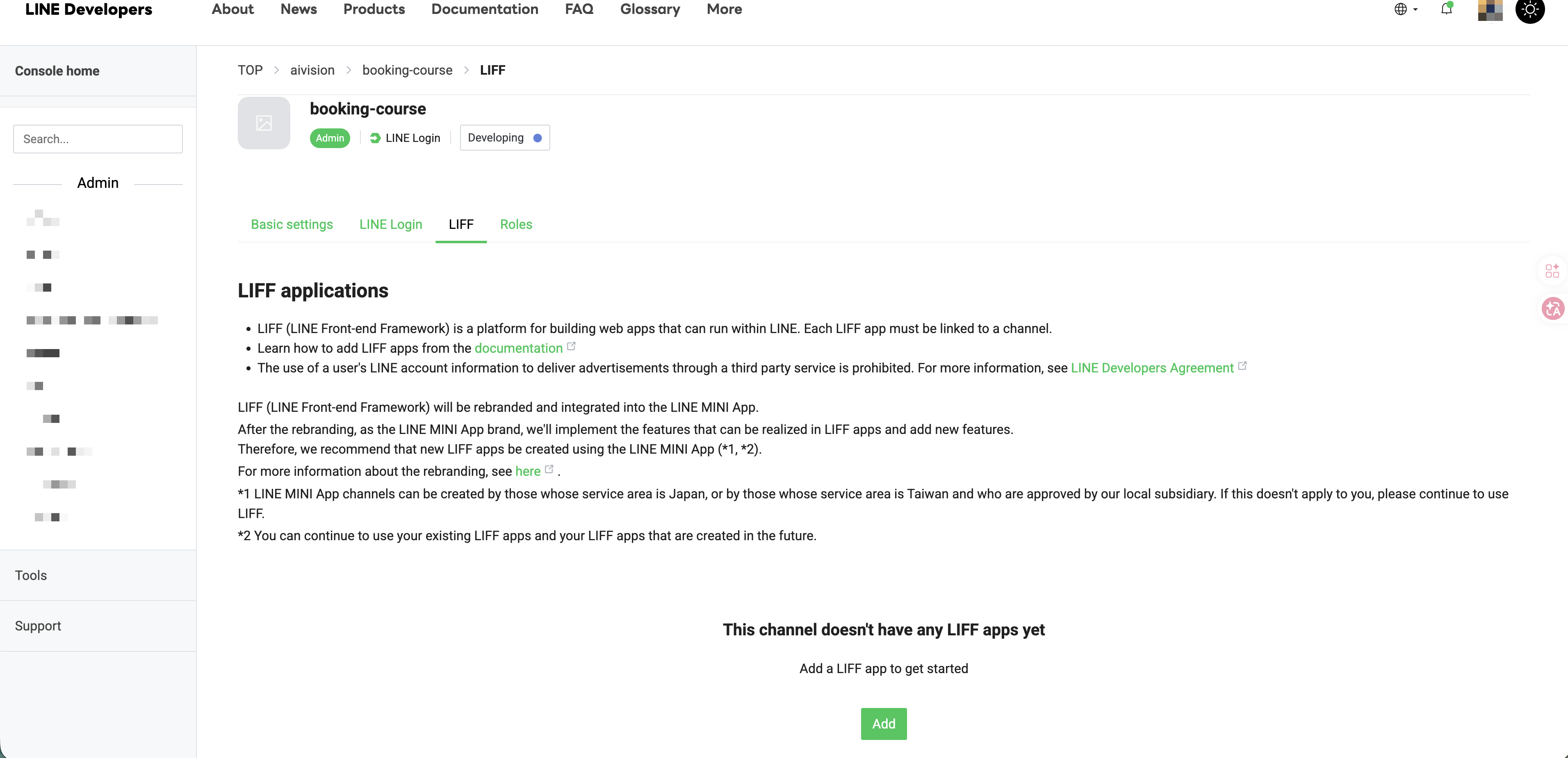
A single channel can hold multiple LIFF Apps — for example one for a “booking page” and one for a “member page.”
Step 5: Fill in the LIFF App settings
Every field is required:
- LIFF app name: the display name (
booking-coursehere; can’t be empty, no special characters, max 256 chars). - Size: choose Full (full screen). Tall and Compact differ only in how much screen height they take when opened.
- Endpoint URL: your page’s URL — must be HTTPS, no URL fragment (
#...), max 1000 chars. - Scopes: check openid and profile (to get the user’s login identity and basic profile). Enable
chat_message.writeonly if you need it.
Submit when done.
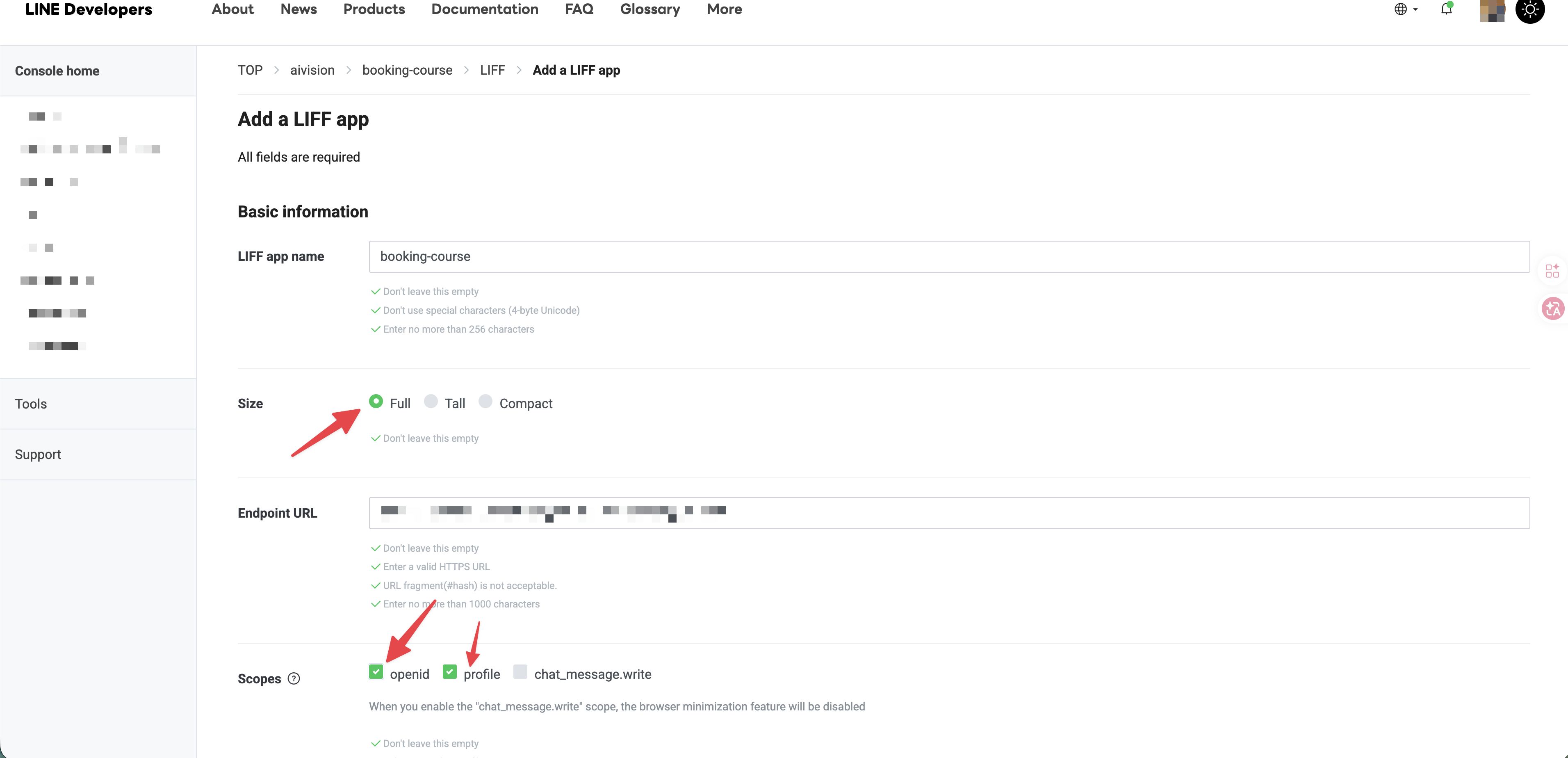
🚨 The most common snag: Endpoint URL must be HTTPS
http:// and local localhost won’t pass. If you don’t have a real domain yet during development, use a temporary HTTPS URL (e.g. one from Cloudflare Pages, Vercel, or ngrok) as a placeholder, and come back to change it before launch.
🚨 What happens if I check chat_message.write?
Checking chat_message.write (letting the LIFF send messages on the user’s behalf) disables the browser-minimization feature. If you don’t need it, leave it off and keep things simple with just openid + profile.
Step 6: Get the LIFF ID and LIFF URL
After it’s created, you return to the LIFF list and see your new App with columns LIFF app name|LIFF ID|LIFF URL|Size. These two values are what you came for:
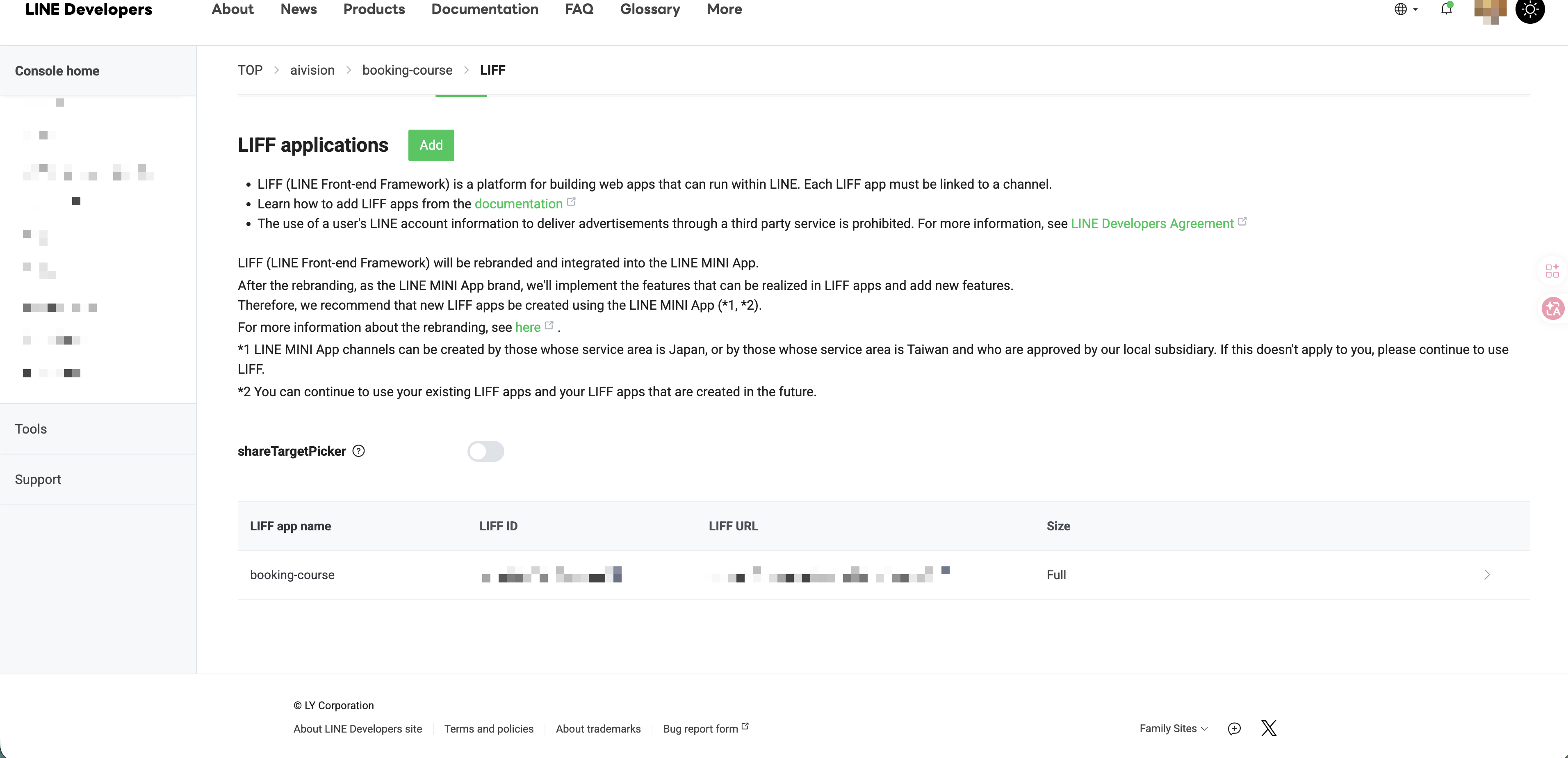
- LIFF ID: used to initialize your front-end code:
liff.init({ liffId: "your LIFF ID" }). - LIFF URL: always formatted as
https://liff.line.me/<LIFF ID>. Share this link — when a user taps it, your page opens inside LINE. - The
shareTargetPickertoggle in the list is for when you want LIFF’s “share to friends” feature.
🚨 LIFF ID vs LIFF URL — easy to mix up
- The LIFF ID is the internal identifier for code, passed to
liff.init(). - The LIFF URL is the human-tappable link — literally
https://liff.line.me/plus the LIFF ID. - You never hand the raw LIFF ID to users; what they always get is the LIFF URL.
Recap
- LIFF lets your web page open seamlessly inside LINE and get the user’s identity directly — great for booking, registration, membership, and survey scenarios.
- A LIFF App must live under a LINE Login channel (not Messaging API).
- One channel can hold multiple LIFF Apps.
- The Endpoint URL must be HTTPS;
localhostwon’t work. - The most common Scopes are openid + profile.
- The values to actually write down are the LIFF ID (for code) and the LIFF URL (for sharing).
這篇文章對你有幫助嗎?
💬 問答區
卡關了?直接在這裡問,其他讀者和作者都能幫忙解答。
載入中...
Found this useful? Share it with a friend who’s also getting their hands dirty
Share on LINE